
Meta’s new AI agent can send the email, book the trip, and keep working after you close the app.
That is the pitch for Muse, a personal AI agent Meta announced on September 8, 2026. It runs at muse.ai and in iOS and Android apps, and you can also message it in WhatsApp.
This guide explains what Muse is, how it differs from a regular AI chat, what it can help physicians with, and what to check before trying it.
Disclaimer: While these are general suggestions, it’s important to conduct thorough research and due diligence when selecting AI tools. We do not endorse or promote any specific AI tools mentioned here. This article is for educational and informational purposes only. It is not intended to provide legal, financial, or clinical advice. Always comply with HIPAA and institutional policies. For any decisions that impact patient care or finances, consult a qualified professional.
What Muse is
Meta describes Muse as a personal AI agent that does tasks instead of only answering questions. You tell it a goal in plain language, such as sending an email or booking travel, and it works through the steps. It runs on Muse Spark, Meta’s own model, from a cloud computer of its own called Muse Secure VM, which has a browser. Meta says it can send email, book travel, fill out forms, and work across the apps you connect.
Muse also keeps going after you close the app. Meta says it comes back when something changes or when it needs your approval, and that it remembers what matters to you well enough to make suggestions on its own. You can reach it in the Muse app, at muse.ai, or in WhatsApp, and Meta says AI glasses are coming.
Muse is free with a usage limit, and Meta’s subscriptions page lists paid plans with larger weekly allowances. Meta’s later announcement says it is available in the US and Canada, though its help pages note it is not yet available everywhere.
How it differs from a regular AI chat
A regular chat answers a question and then waits. Muse takes on a job and keeps going, which is why Meta put so much work into safety. Its research post describes the design.
Each person gets a dedicated cloud computer that holds the agent, along with the data and credentials for any service they connect. A separate program called Sentinel sits outside the agent, and nothing Muse does reaches the internet unless Sentinel approves it.
Meta also says Muse cannot see your passwords or payment methods, because credentials go into secure storage instead. Before sensitive actions, like sending an email or making a purchase, Muse checks with you. You can watch its browser and take over at any time, and an Activity log shows what it has done and which permissions you gave it.
You also control how much access it gets. For email, you choose whether Muse can only read or can also send, and Meta’s connectors page says many connectors can be set to retrieve data without taking any action.
Here are some quick bullet points:
- Muse runs on its own dedicated cloud computer, which holds the agent and the data and credentials for connected services.
- A separate program called Sentinel must approve anything Muse sends to the internet.
- Meta says Muse can’t see your passwords or payment methods, because they’re kept in secure storage.
- Muse asks before sensitive actions like sending an email or making a purchase, and you can watch its browser and take over.
- You choose whether Muse can only read your email or also send, and many connectors can be set to retrieve only.
- An Activity log shows what Muse has done and which permissions you gave it.
Why physicians should care
Muse is built to take over repeat admin work. The most relevant piece for physicians is Muse for Small Business, which Meta announced on September 29.
It adds connectors for tools like QuickBooks, Slack, Zoom, Notion, Canva, Shopify, and Stripe, along with Facebook and Instagram business accounts. A physician who runs a practice or a side business could use those the same way a small business owner would.
Meta’s examples show what that looks like. One sample prompt asks Muse what needs attention across email, calendar, and news, and what it can take off your plate. Meta says Muse can flag emails that need a reply and write the first drafts. Another example asks it to review the month’s financial performance and find expenses that look off, using a connected tool like QuickBooks. Muse can also analyze sales, campaigns, and social activity to draft a growth plan, or look at what is working in ads and content and draft a campaign for your approval. Beyond business tasks, Meta says it can book travel, fill out forms, and turn a long-term goal into a plan that it keeps advancing.
All of these are business and admin tasks, not clinical ones, and they come from Meta’s own launch materials, so results will vary. Meta says Muse will not publish, send, or spend without your approval.
What to check before trying it
The first point is patient information. None of the Meta Muse pages reviewed mention HIPAA or a Business Associate Agreement. Meta’s research post also says its current design restricts Meta staff access through operational policies, but does not prevent Meta from accessing data when needed to support, secure, or run the service. It adds that limited data leaves the cloud computer for inference and telemetry. A version where only the user holds the encryption key, called Muse Confidential VM, is planned for later this year. Until then, patient information should stay out, and anything regulated should go through a compliance team first.
Training and ads are the next point. Meta says conversation data can be used for training after key personal details are removed, and a setting lets you opt out. Meta says it does not share conversations or cloud-computer data with its ad systems, but it notes that what Muse does on the web, such as visiting a store’s website, can still affect the ads you see.
Mistakes are also possible. Meta’s getting started page says Muse may be inaccurate or take unexpected actions and should be monitored, and its research post calls prompt injection an open problem across the industry. Muse can also build custom connectors to other services, and Meta does not review those.
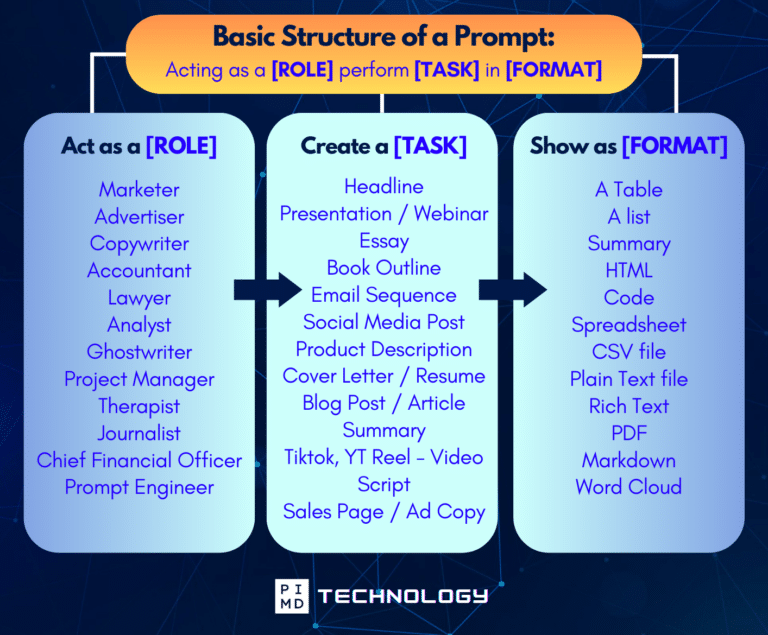
Unlock the Full Power of ChatGPT With This Copy-and-Paste Prompt Formula!
Download the Complete ChatGPT Cheat Sheet! Your go-to guide to writing better, faster prompts in seconds. Whether you’re crafting emails, social posts, or presentations, just follow the formula to get results instantly.
Save time. Get clarity. Create smarter.
How to start
Meta’s guidance page advises starting with low-risk tasks, choosing which connectors Muse can access, checking permission defaults, and reviewing the Activity log regularly. You can disconnect a connector at any time.
A good first task is one where the worst outcome is a bad draft.
Muse shows how quickly personal AI agents are moving from answering questions to doing tasks. For physicians, the appeal is handing off repeat admin work, and the tradeoff is giving an agent access to your accounts. Starting small and keeping patient data out is a sensible way in. And remember, always do your due diligence.
What do you think? Are you willing to try Muse out?
Download The Physician’s Starter Guide to AI – a free, easy-to-digest resource that walks you through smart ways to integrate tools like ChatGPT into your professional and personal life. Whether you’re AI-curious or already experimenting, this guide will save you time, stress, and maybe even a little sanity.
Want more tips to sharpen your AI skills? Subscribe to our newsletter for exclusive insights and practical advice. You’ll also get access to our free AI resource page, packed with AI tools and tutorials to help you have more in life outside of medicine. Let’s make life easier, one prompt at a time. Make it happen!
Disclaimer: This article is for general informational and educational purposes only. It does not constitute medical, legal, compliance, or professional advice. The information provided here is based on available public data and may not be entirely accurate or up-to-date. It’s recommended to contact the respective companies/individuals for detailed information on features, pricing, and availability. All screenshots, if any, are used under the principles of fair use for editorial, educational, or commentary purposes. All trademarks and copyrights belong to their respective owners.
If you want more content like this, make sure you subscribe to our newsletter to get updates on the latest trends for AI, tech, and so much more.
Further Reading
The post What Is Muse AI? Meta’s Personal AI Agent Explained for Physicians appeared first on Passive Income MD.